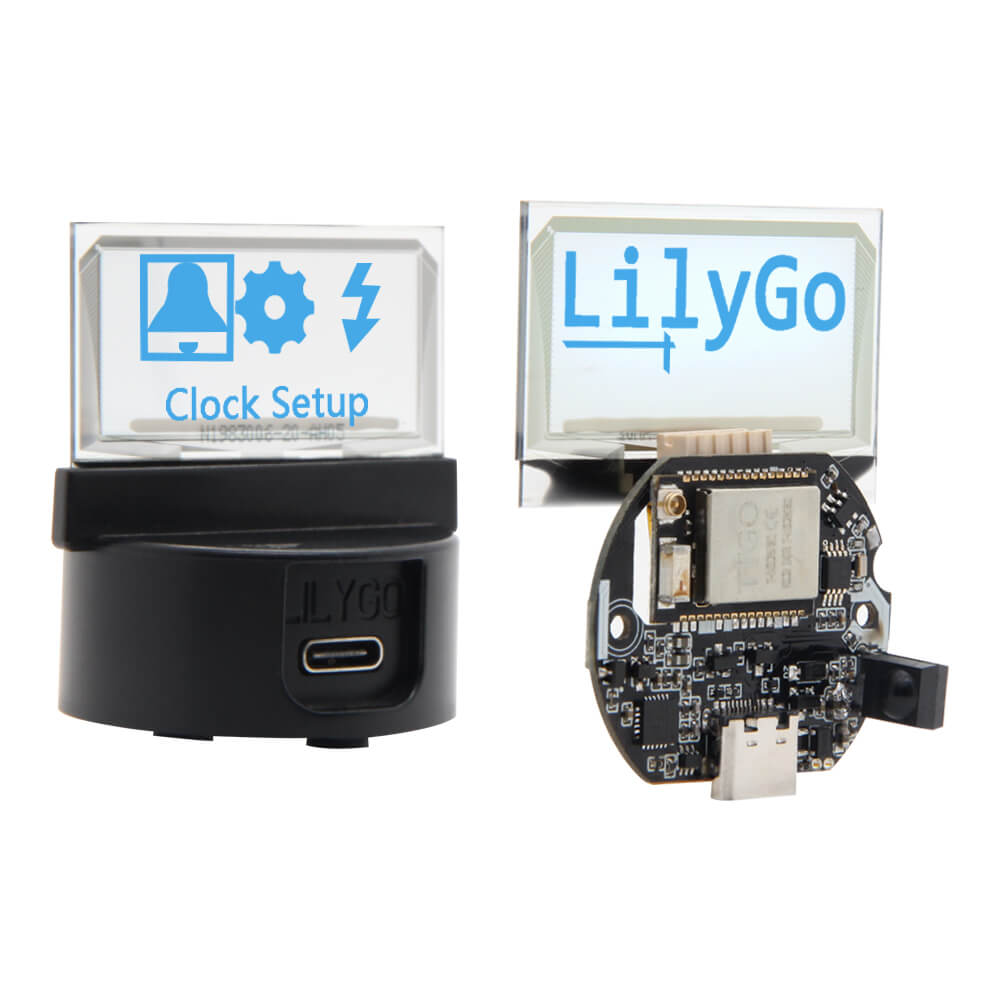
LILYGO T-TV
A programmable desktop transparent mini TV based on ESP32, featuring a 1.54-inch blue transparent OLED display, infrared remote control, touch button, 105mAh battery, and factory firmware with clock, games, and animation.
$26.34
Hardware Specifications
Connectivity
Components
Dual-core Xtensa LX6 with integrated WiFi and Bluetooth
Capacitive touch button sensor
Infrared receiver module for remote control

Where to Buy
Overview
The T-TV is a unique and charming programmable desktop device from LILYGO that takes the form of a miniature transparent television. It features a 1.54-inch blue transparent OLED display housed in a PC+ABS shell, creating a retro aesthetic that stands out on any desk.
Factory firmware comes pre-loaded with a desktop clock, classic airplane and chess games, animation playback, and host sleep functions. All features are controllable via the included infrared remote control. A TTP223 capacitive touch button provides an alternative input method.
The device runs on ESP32, providing WiFi and Bluetooth connectivity for custom firmware development. The board includes a 105mAh battery for portable operation, a USB Type-C port for charging and programming, and a 2.0 4-pin I2C/UART expansion interface with 3.3V output for connecting additional peripherals.
Two variants are available: with shell (K115, $34.69) and without shell (H560, $26.34). The GitHub repository (LilyGo-Tv-lite) provides sample code for custom applications.
Firmware Compatibility
The T-TV can be programmed using Arduino IDE or ESP-IDF. The factory firmware source and example projects are available in the LilyGo-Tv-lite GitHub repository.
Flashing Guide
- Connect via USB Type-C
- Install ESP32 board support in Arduino IDE
- Clone the LilyGo-Tv-lite repository for example sketches
- Select the ESP32 board and COM port
- Hold Boot button while pressing Reset to enter download mode if needed, then flash
Related Products
ESP32This product page may contain errors. If you find any, please report them.