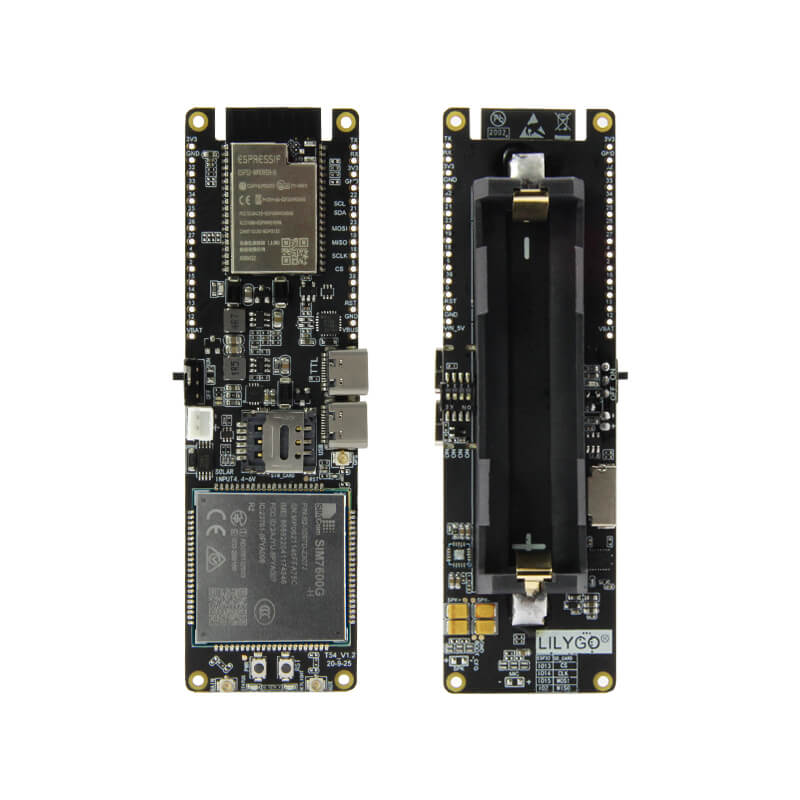
LILYGO T-SIM7600
ESP32-based 4G LTE CAT4 development board with GPS, Wi-Fi, Bluetooth, solar charging input, 18650 battery holder, and dual USB Type-C for industrial IoT and remote connectivity applications.
$49.78
Hardware Specifications
Connectivity
Components
Dual-core Xtensa LX6 processor with integrated Wi-Fi and Bluetooth
4G LTE CAT4 module with GPS, 150 Mbps DL / 50 Mbps UL
USB-to-UART bridge for programming
Resources


Where to Buy
Overview
The LILYGO T-SIM7600 integrates an ESP32 microcontroller with a SIM7600-series 4G LTE CAT4 modem to deliver a complete wireless networking solution for remote IoT deployments. Available in regional variants (SIM7600E-H for Europe, SIM7600G-H for global, SIM7600SA-H for South America/Australia), the board supports download speeds up to 150 Mbps and upload speeds up to 50 Mbps.
The SIM7600 module also includes an integrated GPS receiver, enabling location tracking alongside cellular data connectivity. An 18650 lithium battery holder with solar charging IC and overcharge/over-discharge protection makes the board suitable for off-grid deployments where panels or solar cells provide power. GPS sleep mode draws as little as 300 µA.
Two USB Type-C ports serve different roles: one for ESP32 programming and one to expose the SIM7600 as an industrial network card (USB modem), allowing a connected computer to use the 4G connection directly. SIM and GPS antenna connectors are provided.
Firmware Compatibility
The T-SIM7600 works with the Arduino IDE using the ESP32 core and TinyGSM library for modem communication. AT commands are used to control the SIM7600 module. LILYGO's LilyGo-Modem-Series GitHub repository provides comprehensive examples for HTTP, MQTT, GPS, and SMS. ESP-IDF is also supported.
Flashing Guide
- Install CH9102 USB drivers if required.
- Connect the programming USB Type-C port to your computer.
- In Arduino IDE, select "ESP32 Dev Module" and the correct COM port.
- Open an example from LilyGo-Modem-Series repository.
- Configure your APN settings in the sketch.
- Insert a SIM card and connect antennas before powering on.
- Click Upload to flash.
Related Products
ESP32This product page may contain errors. If you find any, please report them.