Build Guideintermediate
MicroPython ESP32 7.5\" E-Paper Weather Display
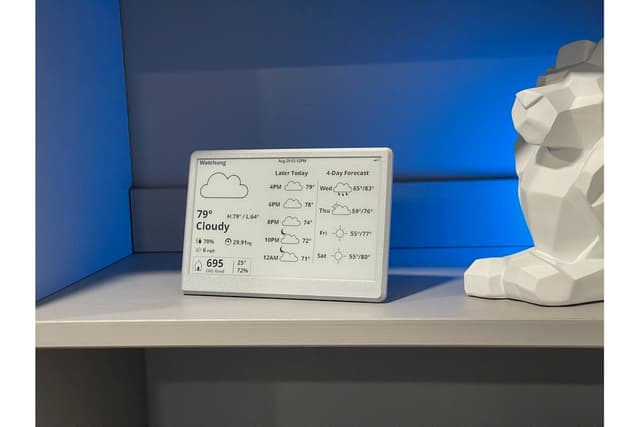
A MicroPython weather station using an ESP32 with a 7.5\" Waveshare e-paper display and DHT20 sensor. Connects to WiFi, fetches live weather data from OpenWeatherMap, and displays forecasts alongside local room temperature and humidity readings.
Boards:ESP32
Firmware:MicroPython
Use Cases:E-Paper & SignageEnvironmental MonitoringDisplay & Dashboard
MicroPython ESP32 7.5" E-Paper Weather Display
A MicroPython-based weather station that combines internet weather data with local sensor readings on a 7.5" Waveshare e-paper display (800x480). Built by Anda2012, this project provides a Python-friendly alternative to Arduino/C++ weather station firmware.
Key Features
- MicroPython firmware: Written entirely in Python for easy customization and learning
- Dual data sources: Fetches live weather from OpenWeatherMap API and reads local room conditions from a DHT20 sensor
- 7.5" e-paper display: Uses the Waveshare 7.5" V2 e-paper (800x480) for a large, readable weather dashboard
- WiFi connected: Connects to your home network for API data and NTP time sync
Hardware
| Component | Notes |
|---|---|
| ESP32 development board | Standard ESP32 with sufficient RAM for MicroPython |
| Waveshare 7.5" e-paper V2 | 800x480px, SPI interface |
| DHT20 sensor | I2C temperature and humidity sensor for indoor readings |
Display Layout
- Current weather conditions with icons
- Temperature (outdoor from API + indoor from DHT20)
- Humidity readings (outdoor + indoor)
- Weather forecast data
Getting Started
- Flash MicroPython firmware to ESP32
- Configure WiFi credentials and OpenWeatherMap API key
- Connect DHT20 sensor and e-paper display via SPI
- Upload Python scripts to the ESP32