Tutorialbeginner
G6EJD ESP32 E-Paper Weather Display
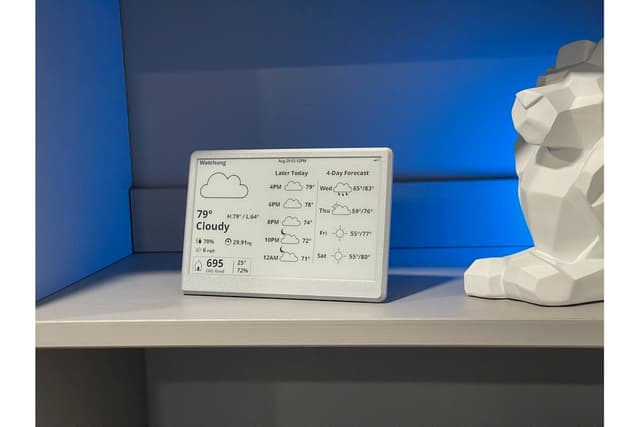
A classic ESP32 e-paper weather display supporting 2.9\", 4.2\", and 7.5\" screens. Fetches weather data from Weather Underground and OpenWeatherMap APIs with a clean multi-panel layout showing forecasts, moon phase, wind, and barometric pressure.
Boards:ESP32
Firmware:Arduino
Use Cases:E-Paper & SignageEnvironmental MonitoringDisplay & Dashboard
G6EJD ESP32 E-Paper Weather Display
A well-established open-source weather display project by David Bird (G6EJD) that has been a reference implementation for ESP32 + e-paper weather stations since its early days. With over 1,100 GitHub stars, it supports multiple e-paper display sizes including the 7.5" Waveshare display used in the UkieLab Weather Station.
Features
- Supports 2.9", 4.2", and 7.5" Waveshare e-paper displays
- Weather data from Weather Underground or OpenWeatherMap
- Multi-panel layout with current conditions, forecasts, moon phase, wind direction, and pressure
- Deep sleep between updates for battery-powered operation
- Well-documented Arduino IDE setup
Display Layouts
The 7.5" version provides the most detailed view with:
- Current temperature and conditions with weather icon
- Multi-day forecast with high/low temperatures
- Barometric pressure trend graph
- Wind speed and direction indicator
- Moon phase display
- Sunrise and sunset times
Getting Started
- Install Arduino IDE with ESP32 board support
- Install GxEPD2 and ArduinoJson libraries
- Configure WiFi credentials and API keys
- Select your display size and upload