ESP-RFID — Standalone Access Control System
A standalone RFID access control system for ESP32 relay boards with web-based user management (1,000+ users), MQTT integration, NTP sync, and support for RC522, PN532, and Wiegand readers.
Overview
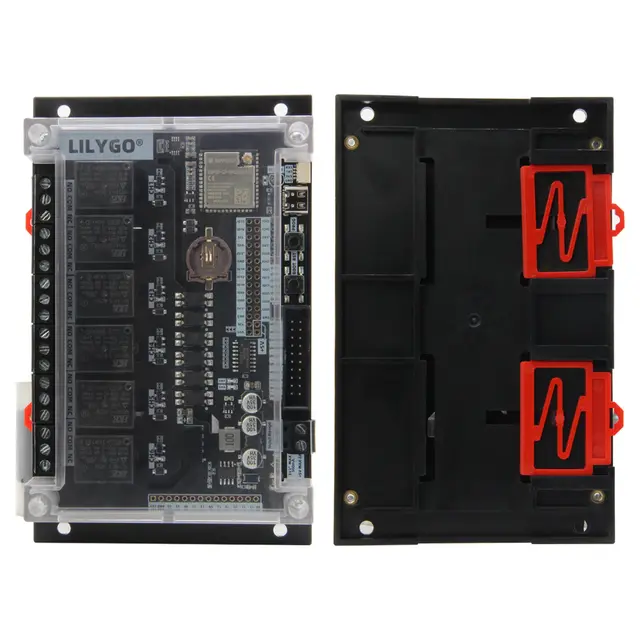
ESP-RFID (1,400+ GitHub stars) is a mature, standalone RFID access control system that runs entirely on an ESP32. It manages up to 1,000 authorized users via a built-in web interface, controls door strikes or magnetic locks via relay outputs, and integrates with Home Assistant via MQTT. The LILYGO T-Relay S3 with its 6 onboard relays can control multiple access points from a single board.
Key Features
- Multi-Reader Support: Works with RC522 (MIFARE), PN532 (NFC), Wiegand, and RDM6300 RFID readers
- Web User Management: Add, remove, and manage up to 1,000 authorized users via the built-in responsive web UI
- Access Logging: Full event log with timestamps for every card scan — granted and denied
- MQTT Integration: Publish access events to Home Assistant for automation (e.g., turn on lights when you badge in)
- NTP Time Sync: Accurate timestamps for access logs without an RTC module
- Backup/Restore: Export and import user databases as JSON files
- Multiple Relays: With the T-Relay S3's 6 relays, control multiple doors, gates, or parking barriers
Getting Started
Flash ESP-RFID via PlatformIO. Connect an RC522 or PN532 RFID reader module via SPI or I2C. Wire a relay output to your electric door strike or magnetic lock. Access the web interface to add authorized RFID card numbers. Scan a card to unlock — it's that simple.
Why This Project
Commercial access control systems cost hundreds per door. ESP-RFID with a T-Relay S3 delivers a complete multi-door access control system for under $25 in hardware. The web-based management means no special software is needed — any browser on your network can manage users and view access logs.