Tutorialbeginner
Bee Data Logger Getting Started with CircuitPython
Complete beginner guide to setting up the Bee Data Logger with CircuitPython. Covers flashing firmware, using the RGB LED, reading the RTC, listing SD card files, monitoring battery voltage, and detecting USB power.
Boards:ESP32-S3
Firmware:CircuitPython
Use Cases:IoT PrototypingData LoggingEducation
Overview
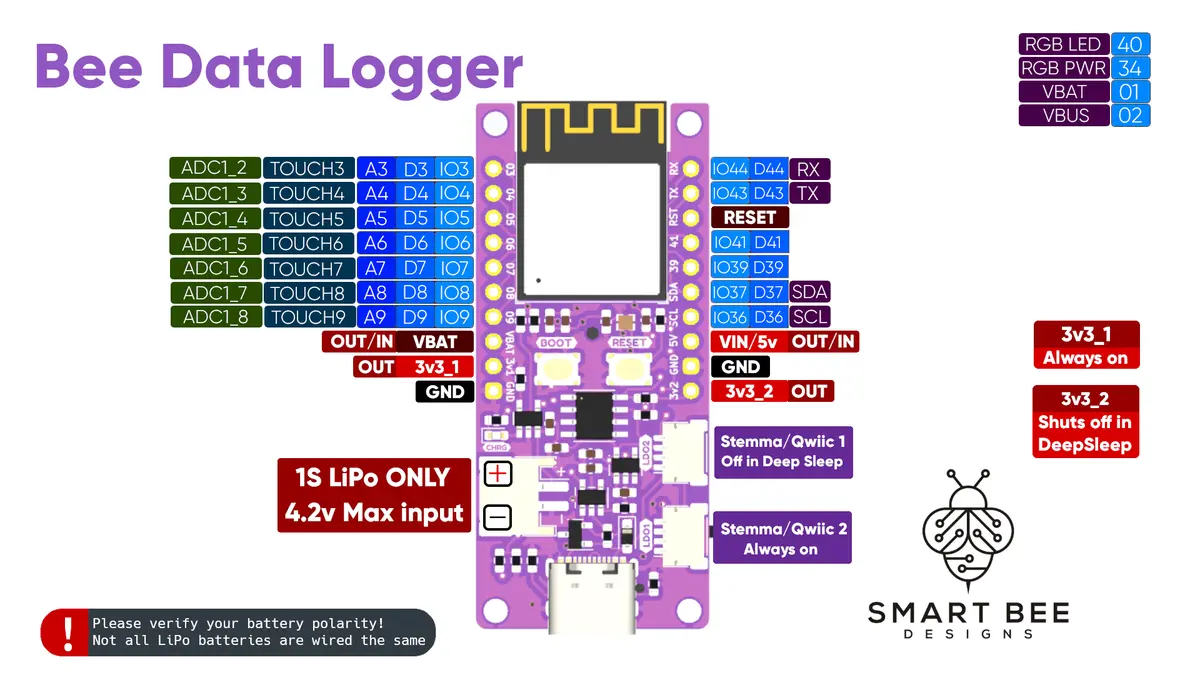
This tutorial walks through every built-in feature of the Bee Data Logger using CircuitPython. The board ships with CircuitPython support and the official GitHub repo includes ready-to-use examples for each peripheral.
Getting Started
- Download the CircuitPython firmware from the official board page
- Flash the UF2 firmware via USB-C
- The board appears as a USB drive -- copy code.py files to run them
Example Projects Included
RGB LED Control
- Rainbow: Cycles through colors using the onboard NeoPixel
- Solid Colors: Set specific colors for status indication
Real-Time Clock (DS3231)
- Read and set the current time
- Use RTC for wake-from-sleep scheduling
SD Card Operations
- List Files: Browse the microSD card contents
- Save ADC to SD: Log analog readings to CSV
- Save RTC to SD: Log timestamped data
- Name Files With RTC: Automatically name log files by date
- SD All Functions: Comprehensive SD card read/write demo
- Deep Sleep SD: Full low-power logging workflow
Battery & Power
- VBAT: Read LiPo battery voltage via the built-in voltage divider
- VBUS Sense: Detect whether USB power is connected
- Stats: Display system information
The bdl.py Helper Module
The CircuitPython examples use bdl.py, a helper module that pre-configures all the Bee Data Logger's pins and peripherals for easy access.