Tutorialbeginner
Build an Armachat LoRa Communicator (Make: Magazine)
Step-by-step Make: Magazine tutorial for building the Armachat LoRa communicator — a battery-powered text walkie-talkie with QWERTY keyboard, RFM95 radio, and 4+ km range using only ~25 components.
Boards:ESP32-S3
Firmware:Arduino
Use Cases:Mesh NetworkingPortable DeviceEducation
Overview
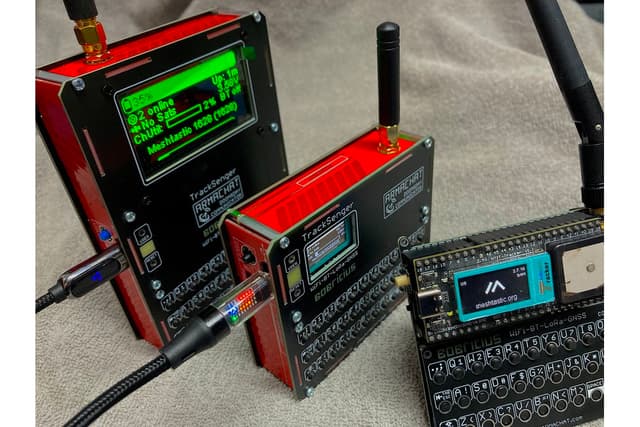
Published by Make: Magazine, this step-by-step tutorial guides you through building the Armachat — a battery-powered, text-based LoRa walkie-talkie with an extremely low component count (around 25 parts). The project covers soldering, firmware flashing, and operating the device for long-range off-grid communication.
What You'll Build
A handheld LoRa communicator featuring:
- RFM95 LoRa radio module for long-range wireless communication
- QWERTY keyboard with 30 tactile buttons
- TFT LCD display
- SMA antenna connector
- Optional LED backlighting (one LED per key)
- 18650 battery power
Build Steps
- Solder the RFM95 LoRa radio module — the first and most critical step
- Flash the Arduino firmware and verify "LoRa init succeeded" on the display
- Solder the buttons — 30 tactile switches for the keyboard
- Attach the SMA antenna connector
- Optional: Solder 30 backlit LEDs for keyboard illumination
Operation
The communicator is controlled via keyboard shortcuts:
- Press S from the main screen for Setup (frequency, LoRa settings, ID)
- Address book supports 10 contacts with fixed names
- Configurable spread factor and radio transmission power
- Messages are automatically resent when recipients come in range
Skills Required
Basic through-hole soldering. The design uses minimal active components and is deliberately accessible to makers of all skill levels.