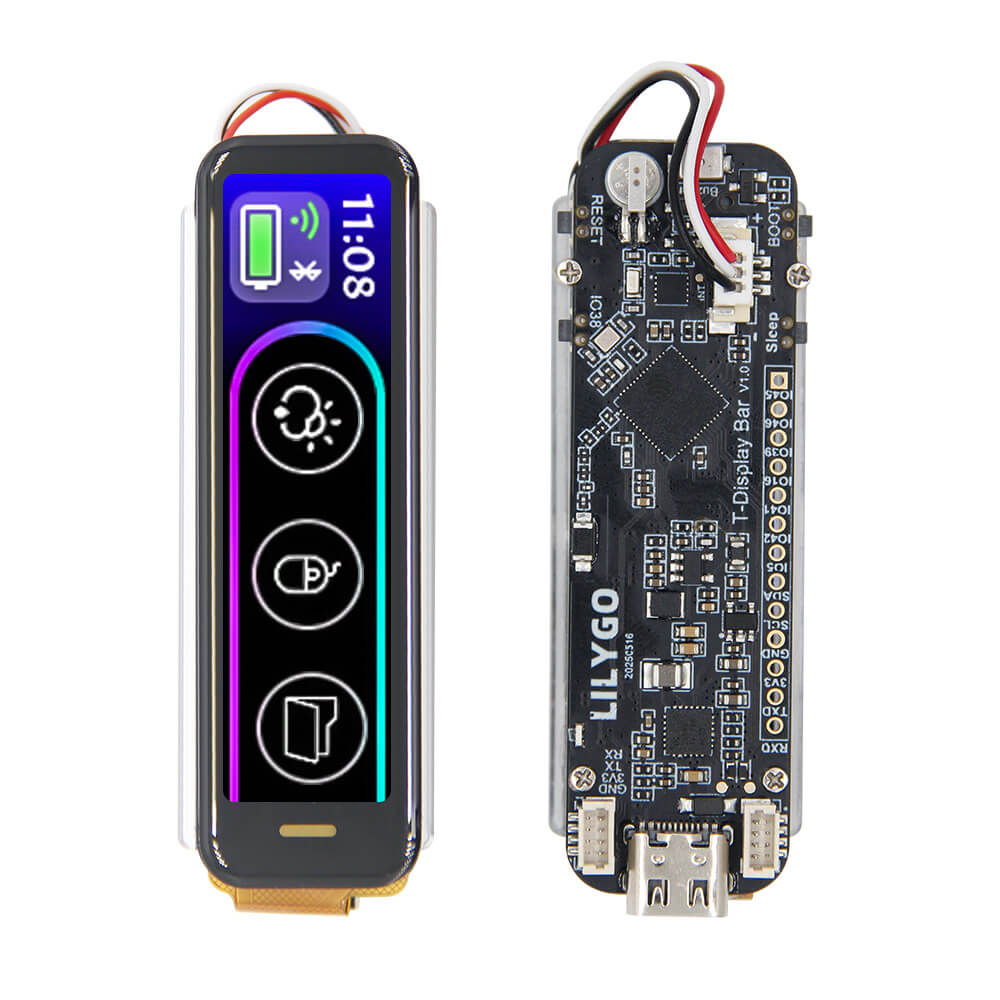
LILYGO T-Display Bar
ESP32-S3R8 board with a 2.25-inch bar-form IPS LCD (76x284px), BHI260AP AI IMU, RTC, smart battery charger, and 50 GPIOs. Designed for wearable and instrumentation display applications.
$27.36
Hardware Specifications
Connectivity
Components
Dual-core Xtensa LX7 at 240MHz with 8MB PSRAM, Wi-Fi, and BLE 5
6-axis AI-powered inertial measurement unit with built-in sensor fusion
Low-power real-time clock with alarm and timer functions
Single-cell Li-ion/LiPo smart charger with power path management
Single-cell Li-ion battery fuel gauge with state-of-charge reporting
Resources


Where to Buy
Overview
The LILYGO T-Display Bar is a narrow-form-factor development board designed for bar-style display applications such as smart watches, fitness trackers, instrument panels, and IoT dashboards. Its defining feature is the 2.25-inch IPS LCD with a 76x284 pixel resolution in a tall, slender aspect ratio, making it ideal for scrolling text, vertical meters, and sidebar UI designs.
The board is powered by the ESP32-S3R8, which integrates 8MB of PSRAM directly into the package alongside the dual-core Xtensa LX7 processor. This provides sufficient memory for LVGL-based UIs, animated graphics, and sensor data buffering. The 16MB external flash holds firmware, assets, and local data logs.
Key features:
- 2.25-inch IPS LCD display, 76x284 pixels, bar form factor
- BHI260AP AI-powered 6-axis IMU for gesture and motion detection
- PCF8563 RTC for accurate timekeeping independent of Wi-Fi NTP
- BQ25896 Li-ion/LiPo smart charger with power path management
- BQ27220 fuel gauge for precise battery state-of-charge reporting
- Onboard buzzer and TF (microSD) card slot
- 50 GPIO pins exposed for peripherals
- Wi-Fi 802.11 b/g/n and Bluetooth 5 LE
The BHI260AP IMU includes an embedded AI coprocessor for sensor fusion, step counting, gesture recognition, and activity classification — all running independently of the main CPU. Combined with the BQ25896 charger and BQ27220 fuel gauge, the T-Display Bar provides a complete wearable platform with power management handled in hardware.
Firmware Compatibility
- Arduino: Supported via the
arduino-esp32package. UseESP32S3 Dev Moduleas the board target with PSRAM set to OPI PSRAM. LilyGO provides Arduino examples for the display, IMU, RTC, and power management in the GitHub repository. - ESP-IDF: Full support with native SPI display drivers, I2C peripheral access for BHI260AP/PCF8563/BQ25896/BQ27220, and LVGL integration.
- PlatformIO: Works with the
espressif32platform. Specify the board asesp32-s3-devkitc-1and configure PSRAM as OPI.
Flashing Guide
- Connect the T-Display Bar to your computer via USB-C cable.
- The board should appear as a serial device automatically.
- If it does not enter download mode, hold BOOT while pressing RESET, then release BOOT.
- For Arduino IDE: install the ESP32 board package (v2.x or later), select ESP32S3 Dev Module, set PSRAM to OPI PSRAM (8MB), and set Flash Size to 16MB.
- For ESP-IDF:
idf.py -p /dev/ttyUSB0 flash monitor - For esptool:
esptool.py --chip esp32s3 --port /dev/ttyUSB0 --baud 921600 write_flash -z 0x0 firmware.bin - After flashing, press RESET to boot into the new firmware.
- Consult the GitHub repository for pin definitions, display driver setup, and example sketches.
Related Products
ESP32-S3This product page may contain errors. If you find any, please report them.