Tutorialintermediate
TinkerRTK WiFi Base Station and Rover Setup
Step-by-step tutorial for building an RTK positioning system using two TinkerNav boards communicating over WiFi, achieving centimeter-level GPS accuracy with a local base station and rover.
Boards:ESP32-S3RP2040
Firmware:Arduino
Use Cases:GPS Tracking
Overview
This tutorial walks through setting up a complete RTK (Real Time Kinetic) positioning system using two TinkerNav boards connected via WiFi. One board acts as a stationary base station generating RTCM correction data, while the other operates as a mobile rover computing an RTK position fix.
What You'll Learn
- How to configure a TinkerNav as an RTK base station
- How to configure a second TinkerNav as an RTK rover
- Setting up WiFi communication between base and rover
- Accessing real-time position data through a web interface
- Proper GNSS antenna placement with ground planes for optimal signal quality
Hardware Required
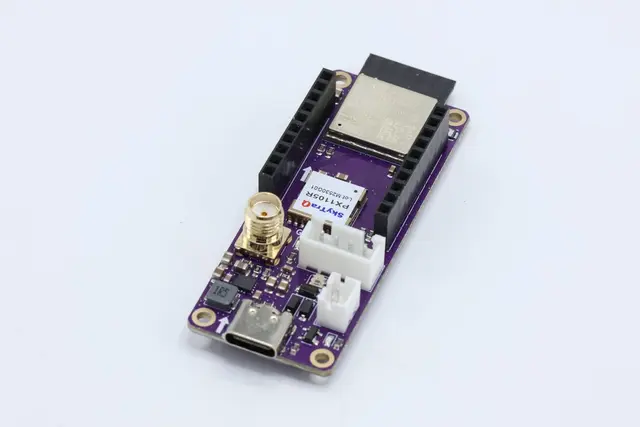
- 2x TinkerNav RTK GNSS base boards
- 2x GNSS antennas (L1/L2/L5 multi-band recommended)
- USB-C cables for programming
- Optional: aluminum foil or metal ground plane for antennas
- Optional: 1S or 2S LiPo battery for portable operation
Setup Steps
- Hardware Assembly: Connect GNSS antennas to the SMA connectors on each TinkerNav board. Place antennas outdoors with a metal ground plane beneath to reduce multipath interference.
- Flash Base Station Firmware: Download the WiFi base station sketch from GitHub, open in Arduino IDE, and flash to the first TinkerNav via USB-C.
- Flash Rover Firmware: Download the WiFi rover sketch and flash to the second TinkerNav.
- Configure WiFi: Both boards connect to the same WiFi network. The base station broadcasts RTCM corrections via TCP.
- Monitor Results: Access the rover's IP address in a web browser to view real-time RTK position data.
Tips
- Use a metal ground plane (at minimum aluminum foil) beneath each antenna to improve signal quality
- The base station should remain stationary at a known position
- Allow several minutes for the RTK solution to converge to a fixed position