Tutorialintermediate
TinkerRTK LoRa Base Station and Rover
Tutorial for setting up a long-range RTK positioning system using TinkerNav boards with TinkerSend LoRa radios, enabling RTCM correction data transmission over distances up to 6 km.
Boards:ESP32-S3RP2040
Firmware:Arduino
Use Cases:GPS TrackingLoRa & WAN
Overview
This guide demonstrates how to build a long-range RTK GPS system using LoRa radios for base-to-rover communication. LoRa enables correction data transmission over 5-10 km with clear line of sight, making it ideal for outdoor surveying, agriculture, and robotics applications where WiFi coverage is unavailable.
What You'll Learn
- Assembling TinkerNav boards with TinkerSend LoRa radio modules
- Configuring LoRa-based RTK base station and rover
- Understanding RTCM message packetization over LoRa (256-byte packet limit)
- Achieving centimeter-level positioning at multi-kilometer ranges
Hardware Required
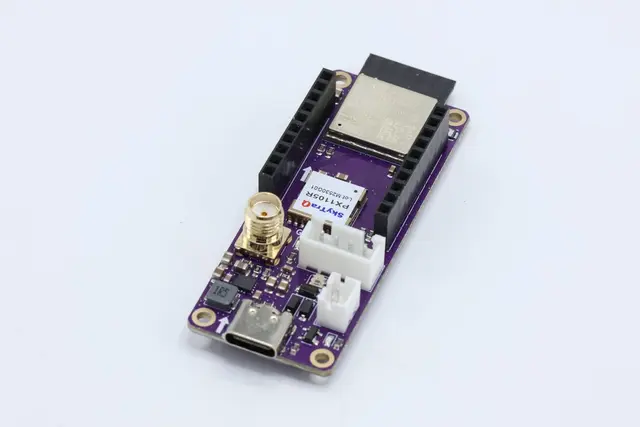
- 2x TinkerNav RTK GNSS base boards
- 2x TinkerSend LoRa radio modules
- 2x LoRa antennas (900 MHz or 400 MHz band)
- 2x GNSS antennas (multi-band L1/L2/L5)
- USB-C cables for programming
- Optional: LiPo battery (1S or 2S) for field deployment
- Optional: WiFi device for status monitoring
Setup Steps
- Hardware Assembly: Connect GNSS antenna to the SMA connector. Insert the TinkerSend LoRa module into the parallel 10-pin headers, aligning the printed arrows. Attach LoRa antenna to the U.FL connector.
- Install Dependencies: Use Arduino Library Manager for standard libraries and download Tinkerbug libraries from GitHub.
- Flash Firmware: Flash the LoRa base station and rover sketches separately via USB-C using Arduino IDE.
- Deploy: Position the base station at a known location with clear sky view. The rover receives corrections via LoRa and computes RTK-corrected positions.
Range and Performance
- Up to 6 km line-of-sight with clear conditions
- LoRa packets limited to 256 bytes, so RTCM messages are automatically split and reassembled
- RTK fix typically achieved within a few minutes of operation