ADX-MINI Open-Source Firmware for Digital HF QRP Transceiver
Open-source Arduino firmware for the ADX-MINI family of digital mode QRP transceivers (MINI, MI2, MI3), supporting FT8, FT4, JS8Call, and WSPR on HF bands from 160m to 6m with CAT control and OLED display.
Overview
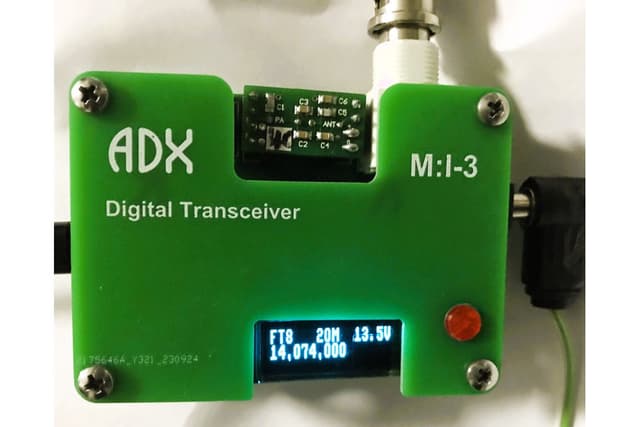
The ADX-MINI firmware is the open-source Arduino codebase that powers the ADX-MINI family of digital mode QRP transceivers designed by Scott Baker (KJ7NLA). The project includes firmware for three hardware revisions — the original ADX-MINI, the ADX-MI2 (with onboard USB sound card), and the ADX-MI3 (with OLED display and expanded CAT commands).
The firmware is a variation on the original ADX (Arduino Digital Transceiver) design by Barb WB2CBA, adapted for the MINI form factor with a CD2003 receiver chip and Class-E QRP transmitter. It is designed to work with WSJT-X software running on a host computer for FT8, FT4, JS8Call, and WSPR digital mode operations.
Key Features
- Support for FT8, FT4, JS8Call, and WSPR digital modes
- Coverage of HF bands from 160m to 6m using pluggable low-pass filter modules
- CAT control emulating Kenwood TS-2000 for seamless WSJT-X integration
- Si5351 programmable clock generator for frequency synthesis
- ADX-MI3 variant adds 128x32 OLED display with one-button UI and Tune Mode
- ADX-MI2/MI3 variants integrate USB hub, sound card, and serial adapter via single USB-C
- Approximately 5W RF output on 20m band
- Arduino IDE compatible for easy modification and flashing
Hardware Variants
- ADX-MINI: Base model with discrete USB connections
- ADX-MI2: Enhanced with onboard USB sound card, firmware-compatible with MINI
- ADX-MI3: Redesigned UI with OLED display and expanded CAT commands (not firmware-compatible with earlier versions)
Getting Started
- Clone the repository from GitHub
- Open the appropriate firmware file in Arduino IDE (MINI/MI2 or MI3)
- Install required libraries (Etherkit SI5351, SSD1306 for MI3)
- Flash to ATmega328P via USB or ISP programmer
- Connect to computer running WSJT-X with Kenwood TS-2000 CAT profile